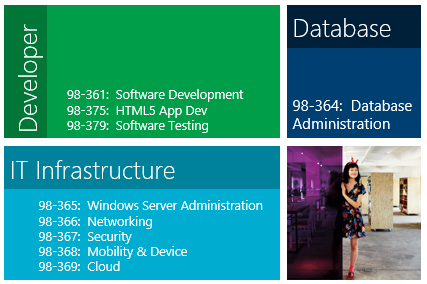
Certification

MTA at Zenos

A lot of people have been asking me about the recent Zenos video success story that was made by Prodigy Learning and Certiport. I’ve been involved with the MTA since autumn 2009 and led one of the first pilots worldwide. The MTA is an excellent stepping stone to the higher level certifications and helps to build confidence.

Enjoy the video:

If you want to run the MTA programme at your institution, please visit Prodigy Learning (UK/Ireland) and Certiport (US and beyond). If you want to study towards the MTA and other great qualifications and are aged 16-24, please visit Zenos.


MCT Wallet Cards

When the revolution came and MCP cards were withdrawn from the MCP benefits, MCTs were still receiving a brand new card every year. It was nice and shiny and showed off our range of certifications at the back. Now with the release of the brand new MCP wallet cards, the question had to be asked would we MCTs be getting the new card as a free benefit or would we have to pay (in addition to the annual fee).

I am pleased to announce that MCTs will still get a free wallet card in the next programme year (2012-2013).  The difference is that MCTs will need to proactively go to the wallet card site to order the card instead of it being sent in the kit.  The site has been set up so that when you choose MCT for the front of the card, it will give you the card for free.  The process will start in the next programme year as everyone has already received their current wallet card.

The new wallet cards with the Microsoft Tag link to the VBC profile look great and definitely have an air of sophistication about them. However, they are limited to only 5 certifications to go on the back of the card. My current MCT card has 10! I’m sure that more experienced trainers have a lot more. So the price of new technology is losing the extra certifications. The plus side is that if a prospective employer wants to check that you actually have a certification a simple Tag scan will tell them everything they need to know.

If you do have a VBC profile and intend to carry around one of these cards in your wallet, then I would strongly recommend that you adjust your profile to limit the amount of personal information e.g. address, phone number, when you go on holidays etc. The danger is that your wallet could be stolen and then the criminal can access information that you would like to keep private.

Technology – powerful in the right hands, extremely dangerous in the wrong hands…


MCP Wallet Cards are BACK!

Somehow I missed this earlier in the week, but if you are a MCP and missed out on the era of free wallet cards or have worn out your existing ones, then you now have the opportunity to buy a shiny new wallet card.

Microsoft has updated the style and colours to be more in line with the recent branding (Red for Trainers, Green for Technical and Orange for Office). You can also customise the back of the card to add up to 5 more certifications. Say for example, you’re a MCITP – so that can be your primary card. Let’s say on the way you took the MTA, MCP, MCSA, MCTS and MCDST, then you can include those on the back. A nice handy way to confirm with your prospective employer of your certifications.

The coolest factor has to be the Microsoft Tag code on the back of your card – this links your card to your online VBC. Once again making it more valuable.

The final addition on the new card is the option to add your picture to it – I’m not a big fan of ID cards (having had to carry around a “Gaijin card” for 2 years in Japan just felt wrong) so this feature is quite subjective. I can see people uploading icons/logos of their own companies to replace this. It will be interesting to see if this feature is taken up.

When I went through the system, it gave me a price of $8.95 – not too bad (if the cards are well made!)

You can order your wallet card by logging into the MCP member site: http://www.microsoft.com/certified


Writing a KILLER CV for a new IT PRO

I often get asked by students on our programme to look at their CV – in recent days I’ve been avoiding this due to my nature of getting overly involved. I’m always surprised how little our students sell themselves. As a trainer I felt that it was something that was just unique to my class or academy. In my current role, I’ve noted that this is universal. So, this is MY personal thoughts and opinions on the subject and may/may not be useful:

1. Get the names right

If you’ve done a programme of study, gained some useful CompTIA and Microsoft certifications, getting the names right is paramount. On a CV with just a smattering of certifications, it is important to give the exam codes so that you can demonstrate to the prospective employer that you have actually done the exam and not just the course. The names/numbers/description must be 100% accurate.


2. Leverage your technical experience

A LOT is covered in our intensive programme of study and these skills need to be recognised and not forgotten. The job site “spiders” are constantly on the lookout for key words such as the ones below. Without going into too much detail these are the key words that should be on every new IT Pro’s CV (providing you know it):

Windows Server 2003/2008 (R2), Windows XP/Vista/7, Active Directory, Exchange, Group Policy, installation, migration (WET/USMT), deployment (MDT, WAIK, ImageX), LTI, Microsoft Office 2003/2007/2010, PC hardware maintenance and troubleshooting, resolving common desktop queries, logging support queries in a call logging database, working towards strict SLAs, implementing a LAN, setting up users, configuring printers, setting up folder redirection, analysing data with Excel, creating documents and templates using Word, creating simple websites, using FTP for website upload, delivering coaching sessions to colleagues using MS PowerPoint, using desktop diagnostic tools to identify and resolve faults, creating maintenance schedules, creating technical help manuals, composing proposal documents for an IT procurement project…

There is probably more, but I’ll leave you to think of the rest.

3. Statistics

In order to make your CV stand out, it is vital to provide statistics of your work e.g. completed my apprenticeship with a Microsoft Gold Partner at one of its 31 sites, obtained the highest score on the A+ 701 exam (888) within the academy, logged, resolved and closed 10 complex calls within one hour etc.


4. Soft Skills

It’s important that soft skills aren’t neglected. Having the right attitudes, behaviour and motivation is evident on a CV. A generic CV screams laziness and only by spending hours (if not days) will you be able to create a killer CV.


5.Have more than one version of your CV


It may be that your CV once you’ve implemented all of this becomes longer than 2 pages. Well don’t worry, keep that as a master copy and take sections out/modify when you apply for different jobs. Constantly review and update your CV in order to ensure that you maximise your chances for the job that you really want. Don’t let that CV on the job sites stay unchanged for weeks on end. Log onto to ALL the job sites that host your CV and update it – even if it is a minor change the spiders will latch on to it.


6. Share your Virtual Business Card


Your Microsoft certification gives access to create a virtual business card. Use this tool and ensure that you provide the link in your CV (under your personal details). If the URL is too long, use a URL shortening tool. This will ensure that technically savvy employers can really see that you are genuine.

7. Build up Experience

Currently it’s an employers’ market – they want more for less. So you need to enhance your skills to become more attractive to these employers, you can do this in a range of ways:

Volunteer at local computer classes/shops – this gives you vital hands on experience and shows the prospective employer that you’re willing work hard

Offer your skills online- get involved as a technical expert on the Microsoft forums and share your expertise – you will be surprised how much you already know.

Look for an internship – BIG companies have internships and it may be possible for you to apply.

Take any job – don’t wait for that dream IT field engineer job to come along. Try the Service Desk job, gain experience and while in the role study for further certifications. Once you have a certain amount of experience it will be easier to get your dream job.


Even the slightest change on your CV can affect your chance of getting a job. So keep it up to date, and do it often!

Good luck!


Certiport’s Power of 10

I work in IT Certification.

I’ve seen young people go from being shy and unsure of themselve to becoming mature confident IT Technicians. I would say that most of that is due to Certifications. I can instruct, train, motivate and push, but it’s not until a student goes into that room, where a Certified Instructor has no place, and comes out smiling that the benefits of the training have been realised.

Once you have a certified individual, they become more confident in their working practices, they are happy to take ownership and present at a different level. It has been my pleasure that over the years I have been able to guide over 100 students towards gaining their IT certification and I would like to invite them (and you) to take part in Certiport’s Power of 10 competition.

Simply submit a short video before the end of May explaining how certification has impacted your life and you could win some fantastic prizes.

Check out the video below for more information:


  • Twitter: @zeshandotcom

  • Tags

  • © 1999 - 2011 Zeshan Sattar
    Jarrah theme by Templates Next | Powered by WordPress