Tag: MTA

MTA at Zenos

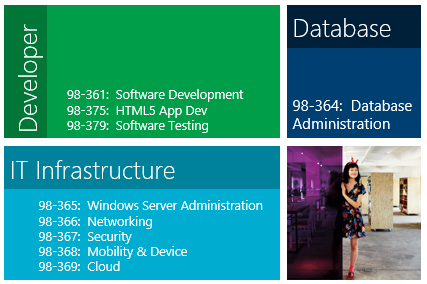
A lot of people have been asking me about the recent Zenos video success story that was made by Prodigy Learning and Certiport. I’ve been involved with the MTA since autumn 2009 and led one of the first pilots worldwide. The MTA is an excellent stepping stone to the higher level certifications and helps to build confidence.

Enjoy the video:

If you want to run the MTA programme at your institution, please visit Prodigy Learning (UK/Ireland) and Certiport (US and beyond). If you want to study towards the MTA and other great qualifications and are aged 16-24, please visit Zenos.


Microsoft IT Academy Summit 2011

On 19 October 2011 over a hundred educators, teachers, technical trainers, decision makers all descended on Microsoft HQ UK in Reading. The one thing that bound all these people together – they all represented UK Microsoft IT Academes from all corners of the UK.

The event was hosted by Greg Pearson (UK Lead, Microsoft Learning). The day was filled with sharing best practice and giving glimpses of the future of Microsoft certification and technologies. Here are some key points from the event:

Key Note

Karen Price OBE (CEO e-skills UK) and Stephen Uden (Head of Skills and Economic Affairs, Microsoft) presented the Key Note. They highlighted how the rate of unemployment (especially youth unemployment) has increased dramatically. Another grim aspect is that the number of young people taking ICT related A Levels had decreased by 14% in the last year. There were plenty of statistics that can be found at:

http://www.e-skills.com/technologyinsights2011

There were a certain number of initiatives that have been launched in order to ensure that the next generation IT workforce will be ready:

A brand new IT GCSE: http://www.e-skills.com/behindthescreen

This will change the focus from the GCSE which has become all about using Office to actually doing coding, understand cyber security and generally getting “behind the screen”.

Computer Club for Girls: http://www.e-skills.com/education/teachers/online-club-cc4g/

To encourage more women to enter the IT industry.

Also some bodies have been set up to “up-skill” the IT workforce:

The National Skills Academy for IT: http://www.itskillsacademy.ac.uk/
Skills Framework for the Information Age: http://www.sfia.org.uk/

ITA Benefits and Certifications

After all this, Greg once more took the stage and ran through the benefits of the ITA programme which can be found here:
http://www.microsoft.com/en-us/itacademy/default.aspx

Greg also highlighted how the “Cloud” is going to drive forward the Microsoft certification track. A summary of current certifications can be found here:
http://www.microsoft.com/learning/en/us/certification/cert-cloud.aspx

Greg mentioned that approximately 10,000 MTA exams were delivered worldwide in the last year – the coolest point of this statistic is that over 4000 of those exams were delivered by Zenos!

Some key dates were mentioned at the ITA summit regarding new MTA certifications:

Mobile Development Fundamentals (98-373)

  • Release: 30 November 2011
  • ERK & SSG: January 2012

Gaming Development Fundamentals (98-374)

  • Release: 17 November 2011
  • ERK & SSG: January 2012

Office 365 coming in June 2012

OCR

Simon Garratt (Qualifications Manager, OCR) gave an update of how they have incorporated MS Certifications as part of their Competency Diplomas – to the point an entire Competency Diploma can be gained by completing a MCDBA – a bit of a tall order!

Lync Demonstration

Ewan Dalton (Partner Group Technology Manager, Microsoft) gave a great demonstration of using Lync in an enterprise. Educational institutions can get this as part of Office 365 for education:
http://www.microsoft.com/liveatedu/learn-about-office-365.aspx

City and Guilds

Ken Gaines (ICT Portfolio Management, City and Guilds) mirrored the talk from OCR and said that they have also incorporated MS certifications completely into their qualifications portfolio.

Best Practice

Best practice case studies were given by:

Alan Stevens, Headmaster at Sawtry College
Julian Brunger, MCT at Walsall College
Richard Seaton, Senior Lecturer at the Open University

You can watch video case studies for Sawtry and Walsall here:
http://www.microsoft.com/uk/education/schools/curriculum-resources/IT-academy/the-programme.aspx

Microsoft Evangelist

Lee Stott (Academic Developer Evangelist) gave a great overview of a range of technologies that can be used in teaching and learning. Lee talked about a range of technologies including:

Kinect: http://kinectforwindows.org/
Gadgeteer: http://research.microsoft.com/en-us/projects/gadgeteer/
Windows Phone: http://create.msdn.com/en-US/home/getting_started
Windows 8: http://www.buildwindows.com/

Microsoft Academic Service Partners

If you need help with harnessing your benefits then in the UK you have access to:

Prodigy Learning: http://www.prodigyuk.co.uk/
IT Skills Management Company: http://www.itskillsman.co.uk/

More information

If you want to know more about the topics discussed at the event, you can view all the presentations at:
http://www.slideshare.net/Microsofteduk/presentations


98-349: Windows OS Fundamentals

It’s nice when a NDA is lifted, you feel that you can talk freely about something that you have worked on. If you don’t know already, a new MTA is coming to an authorised Certiport MTA campus /IT Academy near you. This one is one that is close to my heart: Windows Operating System Fundamentals.

Just check out the Objective Domains (taken from http://www.microsoft.com/learning/en/us/exam.aspx?ID=98-349&Locale=en-us#tab2).

Understanding Operating System Configurations

  • Configure Control Panel options.
    • This objective may include but is not limited to: configuring administrative tools, configuring accessibility options
  • Configure desktop settings.
    • This objective may include but is not limited to: configuring gadgets, profiles, display settings, shortcuts, and Aero configurations and capabilities
  • Understand native applications and tools.
    • This objective may include but is not limited to: understanding Windows Internet Explorer, the snipping tool, Windows Media Player, Windows Media Center, and MSCONFIG
  • Understand mobility.
    • This objective may include but is not limited to: understanding Sync Center, Windows Mobility Center, and Remote Desktop
  • Understand remote management and assistance.
    • This objective may include but is not limited to: understanding MMC, and Windows PowerShell

Installing and Upgrading Client Systems

  • Identify Windows operating system editions.
    • This objective may include but is not limited to: identifying system requirements, using PC Upgrade Advisor
  • Identify upgrade paths.
    • This objective may include but is not limited to: identifying upgrade paths from Windows XP, Windows Vista, and other operating systems; identifying application compatibility
  • Understand installation types.
    • This objective may include but is not limited to: understanding removable media installations (DVD, ZTI, LTI, and USB), cloud and network installations, and product identification keys
  • Understand virtualized clients.
    • This objective may include but is not limited to: understanding Windows XP Mode, Remote Desktop, and Remote Desktop Services

Managing Applications

  • Understand application installations .
    • This objective may include but is not limited to: understanding local vs. network applications, Group Policy, and application removal
  • Understand user account control (UAC).
    • This objective may include but is not limited to: understanding standard user vs. administrative user, understanding types of UAC prompts and levels
  • Remove malicious software.
    • This objective may include but is not limited to: understanding Windows Defender, Action Center, the Malicious Software Removal tool, Windows Registry, and Microsoft Forefront Endpoint Protection
  • Understand services.
    • This objective may include but is not limited to: understanding service start-up types, service accounts, and service dependencies
  • Understand application virtualization.
    • This objective may include but is not limited to: understanding Med-V and VDI

Managing Files and Folders

  • Understand file systems.
    • This objective may include but is not limited to: understanding FAT, FAT32, NTFS, and 32 bit vs. 64 bit
  • Understand file and print sharing.
    • This objective may include but is not limited to: understanding NTFS and share permissions, HomeGroup, print drivers, and effective permissions; creating public, basic, and advanced shares; mapping drives
  • Understand encryption.
    • This objective may include but is not limited to: understanding BitLocker, encrypting file systems (EFS), and compression
  • Understand libraries.
    • This objective may include but is not limited to: understanding offline files, adding multiple local locations to a library, adding networked locations

Managing Devices

  • Connect devices.
    • This objective may include but is not limited to: connecting plug-and-play devices, connecting and disconnecting printers, installing third-party software for devices
  • Understand storage.
    • This objective may include but is not limited to: understanding disk types (NTFS, FAT, etc.), security (encryption), storage device types (eSATA, USB, USB 2.0, IEEE 1394, iSCSI), storage drive types (basic, primary, extended, logical, dynamic disk, VHDs), and cloud storage (Windows Live SkyDrive, OneNote to SkyDrive, Live mesh)
  • Understand printing devices.
    • This objective may include but is not limited to: understanding local printers, network printers, print queues, print-to-file, and Internet printing
  • Understand system devices.
    • This objective may include but is not limited to: understanding video, audio, and infrared input devices, understanding Device Manager

Understanding Operating System Maintenance

  • Understand backup and recovery methods.
    • This objective may include but is not limited to: understanding local, online, and automated backup methods; understanding backup options; understanding System Restore, recovery boot options such as Last Known Good, and various Safe Mode options
  • Understand maintenance tools.
    • This objective may include but is not limited to: understanding Disk Defragmenter, Disk Cleanup, Task Scheduler, Action Center, and System Information
  • Understand updates.
    • This objective may include but is not limited to: understanding Windows updates, Microsoft updates, and hotfixes

Although the exam is at the Associate level, the content as you can see is quite exciting. It fits exactly into the pathway towards MCTS 70-680 (Windows 7, configuring):


Some of the cool things about this (including the items that I have formatted as bold) is that it covers Desktop Virtualization, the client in the cloud, and from what I have seen from upcoming content for this exam that it will definitely be future proof.

The ERK (Exam Review Kit), SSG (Student Study Guide) and exam is set to release this summer. Looking forward to taking it!


MTA at Certification Revolution

Here is my slide deck from the Certification Revolution event. In addition to the slides, the information in the notes panes should provide you with enough information to put together a solid business case to implement the MTA into your curriculum.

Please feel free to get in touch if you need any guidance in bringing the MTA into your curriculum.


Back from the Revolution!

I’m writing this on the train back from London where I was given the opportunity to speak to a (round) room full of educators and instructors. It is an amazing experience to interact with this community due to the fact that the experience that schoolteachers and school leaders have are more akin to the age group that I teach. However, the content that I deliver is more alike to commercial training. Hence to be able to take information from one area of my interests and to be able to give it back to another community is quite enthralling.

I would like to take this opportunity to say thank you to Prodigy, my fellow revolutionaries (speakers) and all the attendees of the Prodigy Certification Revolution event.

I hope that you all enjoyed it and I look forward to communicating with you over the next few weeks to get you “revolutionised” for the MTA.

For more information about how to get started with either MOS or MTA, take a look at: http://www.prodigyuk.co.uk/


  • Twitter: @zeshandotcom

  • Tags

  • © 1999 - 2011 Zeshan Sattar
    Jarrah theme by Templates Next | Powered by WordPress